notebook written work from home text with stationary

Secure Gateway Login Access to your office network

Secure Gateway Access for Remote Office Connectivity

In today’s digital landscape, remote access must be secured with unwavering diligence. At San Diego Computer Consulting, we’ve witnessed countless sophisticated attempts to breach networks, systems, and data. Cybercriminals continue to evolve their tactics—ransomware, phishing emails, and fraudulent schemes are now more prevalent than ever.

Instead of applying their talents to benefit society, many attackers use deception and manipulation to exploit vulnerabilities and steal from honest individuals and businesses.

To combat these threats, San Diego Computer Consulting proudly relies on Microsoft’s built-in remote access solutions. They’re responsive, multi-monitor ready, and fully integrated—offering robust functionality without the hefty price tags of third-party services like GoToMyPC.

Security is paramount, so we enforce strict protocols. Our preferred two-factor authentication method is DUO, which adds an essential layer of protection and ensures only authorized users gain access.
Secure Entry to Remote Access

Windows Remote Desktop Access via RD Gateway with DUO 2-Factor Authentication

An efficient, enterprise-ready solution—fast to deploy, simple to manage.

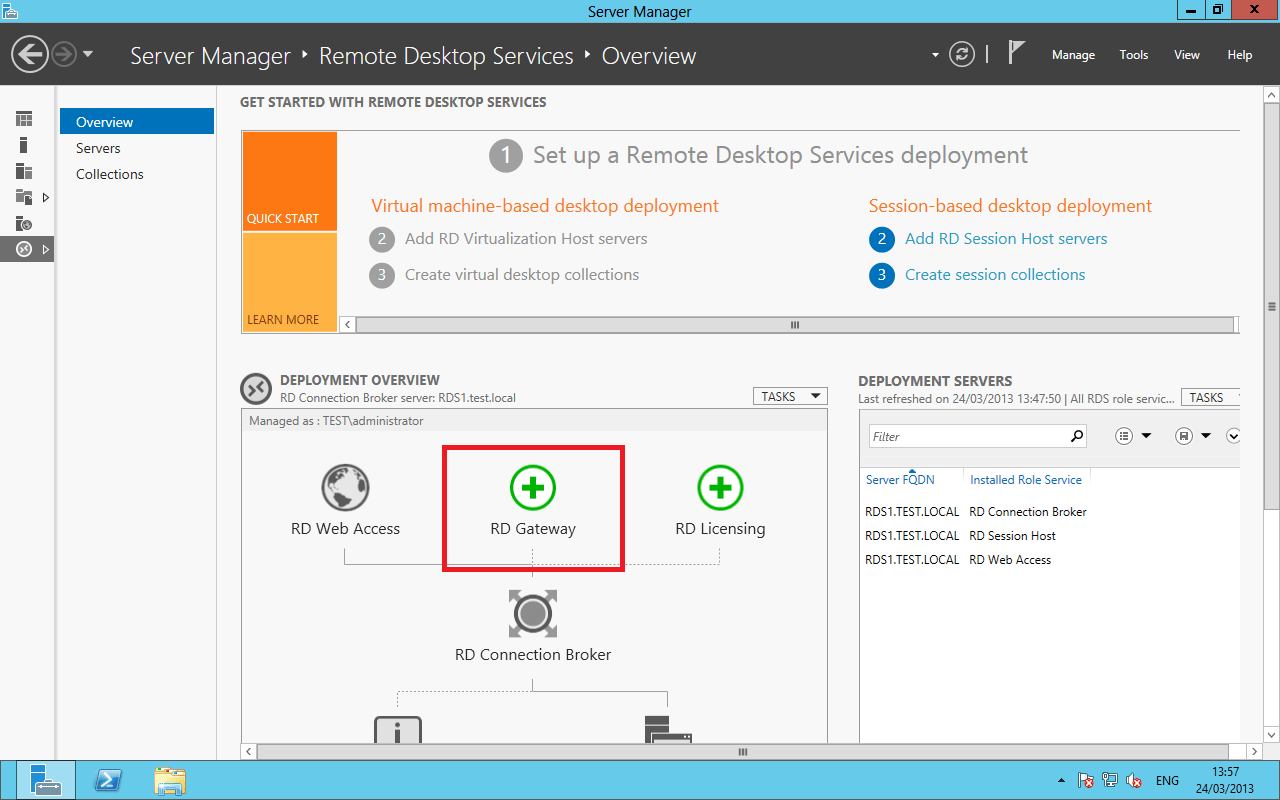
Remote Desktop Gateway enhances the standard Windows Remote Desktop experience by streamlining how remote users connect to their office PCs. Instead of opening individual firewall ports for each machine, RD Gateway uses a single, secure pathway, simplifying access management across the organization.

By leveraging port 3389—the default for all Windows systems—RD Gateway consolidates connectivity and eliminates the need for manual port assignments. This means faster setup, smoother administration, and dramatically reduced complexity when onboarding remote users.

San Diego Computer Consulting pairs RD Gateway with DUO’s robust two-factor authentication, ensuring secure, encrypted access for your entire team. It’s the ideal solution for companies that need responsive remote access with tight security controls.

remote gateway

Looking good Steven Gonzalez

Windows Remote Gateway Service

Streamlined Remote Access Management with RD Gateway and DUO 2-Factor Security

Secure, scalable, and simple for enterprise deployment.

Managing access through Remote Desktop Gateway allows us to deploy a single remote access icon for all team members. Any office computer with Remote Desktop enabled is accessible through this unified login, reducing complexity and making remote connectivity seamless.

Each user account is protected with DUO two-factor authentication, ensuring an added layer of security. In addition, Remote Desktop Gateway requires a Secure Certificate, which encrypts all connections and keeps data safe during transit.

This tightly controlled environment offers tremendous flexibility. You can host a server within your network to manage applications and regulate which users can access them. User accounts can be quickly added or removed, and permissions adjusted as needed.

The system uses an SSL certificate tied to your remote access name and operates over port 443—the standard HTTPS port—ensuring encrypted access and a high level of trustworthiness.

DUO 2-Factor Authentication

Enhanced Security with DUO 2-Factor Authentication for Remote Desktop Access

A simple, secure solution for company-wide remote login protection.

DUO’s challenge-response 2-factor authentication integrates seamlessly with all types of Remote Desktop logins—ensuring that every connection to your Windows network is double verified before access is granted.

At San Diego Computer Consulting (SDCC), we install DUO on individual computers or, preferably, on the Windows Remote Desktop Gateway server. When implemented, DUO connects to its secure cloud-based management portal to control and monitor user access across the organization.

DUO lets you define who can log in, when, and from where. Its administrative interface provides clear visibility into all authorized users and their secure connections. It’s a powerful layer of protection that greatly enhances remote access security.

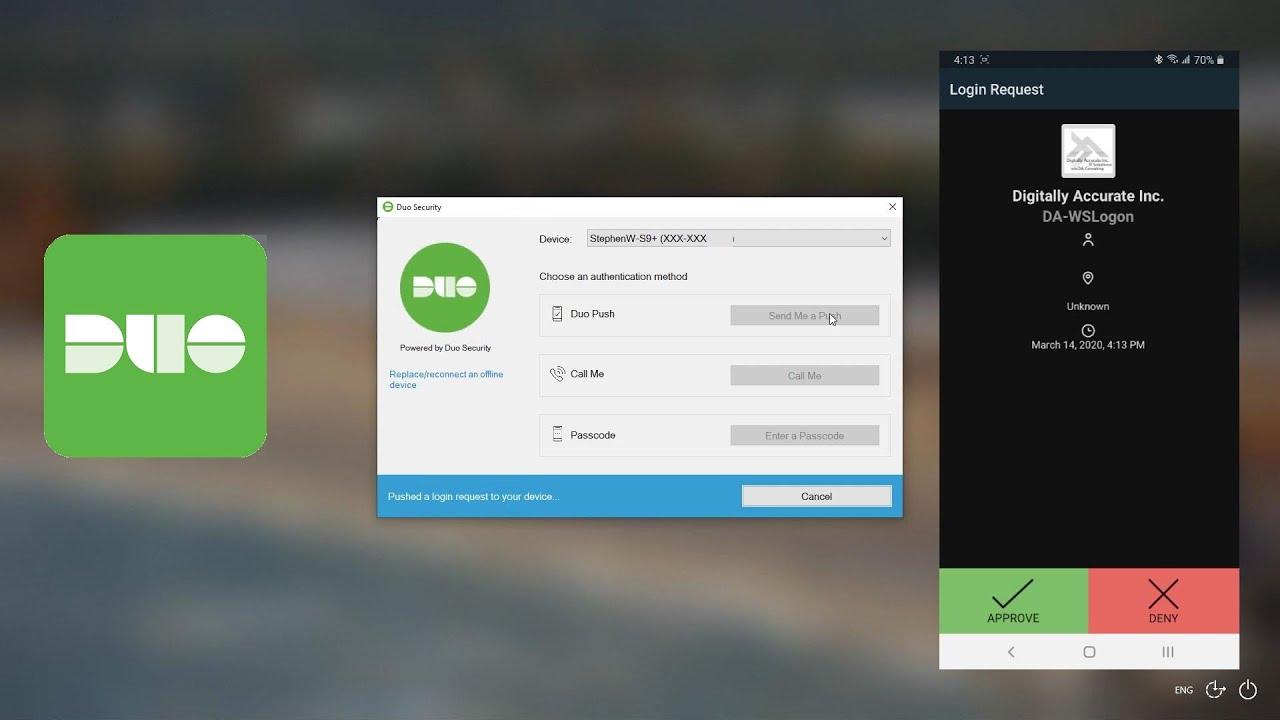
Once enabled, DUO triggers a second authentication after correct credentials are entered. Users simply confirm access on their smartphone app, and their Remote Desktop session begins. Additional options include text message verification or approval through an automated phone call.

VPN

Remote Access: Secure File Services

VPN – Secure Remote Access to Office Network Files

Reliable direct connection for remote users, without requiring two-factor authentication.

Virtual Private Networking (VPN) enables users to securely connect to their office network and access files remotely. Unlike remote desktop protocols, VPN does not require a separate 2-factor authentication—its own encryption algorithms and security protocols ensure a protected connection.

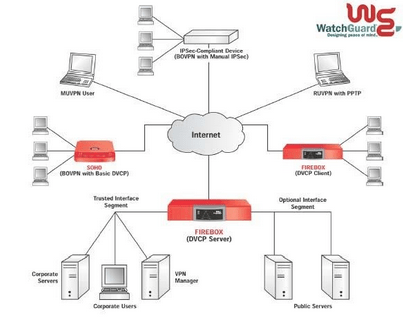
At San Diego Computer Consulting, we support clients using WatchGuard or Sophos routers—both equipped with robust VPN functionality. Users install approved VPN software on their remote devices and authenticate against an authorized user list managed on the router.

This setup provides a direct link to your internal office network through the router itself, allowing users to access resources and files as though they were physically present. It’s a secure, streamlined solution for companies looking to extend access without compromising safety.

VPN Secure Connectivity Protocols

VPN – Secure and Reliable Remote Network Connectivity

A long-standing solution for file access and interoffice networking.

Virtual Private Networking (VPN) uses well-established, secure protocols to create a protected tunnel between remote devices and your office network. It does not require DUO or two-factor authentication—VPN protocols include their own robust security mechanisms.

VPNs allow users to access office network files remotely, with permissions and access rights controlled through standard Windows settings. However, VPN connections do not extend to running in-house office applications directly—they’re best suited for file-level access rather than full desktop integration.

One of VPN’s strongest advantages is its ability to connect multiple office locations into a unified network. This architecture also allows remote users to securely join the same private environment over the public internet—enabling seamless interconnectivity between distributed teams.

San Diego Computer Consulting supports VPN deployment using trusted router platforms like WatchGuard and Sophos, which come equipped with enterprise-grade VPN capabilities. Remote users are authenticated via software installed on their devices and verified against an approved list on the VPN router, ensuring secure access every time.